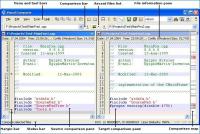
Visual Comparer it is file compare and merge utility for text files with support strict lexical and syntax highlight of constructions in various programming languages.
Visual Comparer its all-inclusive text files visual comparison software allowing end-users see all the differences between two text files in a split screen view mode. Visual Comparer includes full-featured text editor that supports both ANSI and Unicode files (separate versions are available for download) as well as syntax highlighting for most popular programming languages, including C++, C#, JavaScript, Perl, Visual Basic, VBScript and Pascal (Delphi). The application is very handy when there is a need to display file version changes. Visual Comparer represents all differences between two text files using graphical pane, with color lines representing new fragments of text, changed text and lines of text that were left intact. This way, finding the differences is just the matter of seconds.
Visual Comparer is intended mainly for software and web site developers that require dedicated text editor with syntax highlighting and visual comparison feature. However, the application can be used by anyone who has to deal with several versions of the same text file. Visual Comparer is highly configurable, allowing customization of nearly every single part of the interface. Besides that, Visual Comparer supports plug-in architecture, which in turn allows end users expand the program functionality by adding new syntax highlighting patterns. The ability to display line numbers and create custom bookmarks makes navigating text documents real easy, while the reporting feature allows for creation of printable HTML reports covering all the differences between files. Whats new in version 1.80.0525: - manual/auto codepage selection support. Now you can select required codepage for a file before comparing (only unicode version);
Fixes:
- illegal displaying of unicode/language specific characters in message boxes;
- few other little bugs; Requirements: A standard Windows PC Operating system: Win95,Win98,WinME,WinNT 4.x,WinXP,Windows2000,Windows Vista,Windows 7 Limitations: few unessential limitations Release notes: Major Update
Small freeware utility for changing the timestamp attributes of couple of files at once. Main features is include, but not limited by: recursive processing subfolders, setting date and time values for creation, modify and last access attributes.
Price: $0, Rating: 8, Downloads: 197 Download
AllSync is the professional solution for your data synchronization, backup, imaging, replication and archiving needs. AllSync offers a number of preconfigured copy modes for your synchronization/backup tasks which you can custom-adapt as needed.
Price: $24.28, Rating: 10, Downloads: 172 Download
Sprintbit File Manager for Windows XP/Vista/7 (all 32-64 bit) is a fully featured application for viewing, editing, playing and managing files, directories and archives on your computer.
Price: $33, Rating: 8, Downloads: 162 Download
User Rating
Rating:2.2 out of
5 Based on13 ratings.
13 user reviews.

 Visual Comparer 1.80.0525 details